Key takeaways
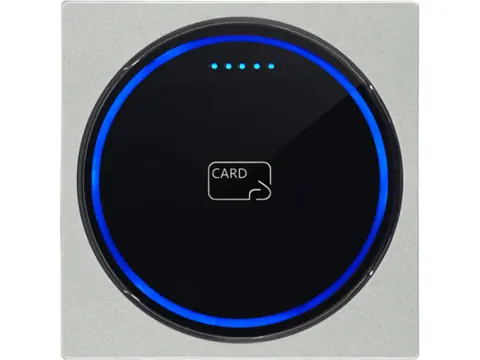
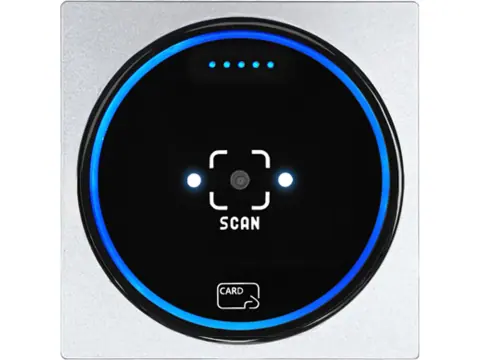
- CR-300 is the card/BLE option; QC-170 adds QR and 1D barcode scanning. Both list OSDP v2.2 and have separate touch-keypad variants.
- Check the exact controller, reader port and firmware before ordering. An RS485 connection alone does not establish OSDP support.
- Secure Channel and OSDP Verified status are separate procurement checks. Neither is verified for these two SKUs in our current records.
- Approve credential output, PIN or QR behavior and the required security configuration on a sample setup before committing to the project batch.
Not sure which OSDP reader fits?
Describe the entrance workflow and controller you plan to use. Request a configuration review before choosing a reader or evaluation sample.
Add project details (all optional)
Unknown details can stay “To confirm”. Review the project brief and add your quantity, delivery country and contact details in the inquiry form. Compatibility, the proposed configuration and sample test scope need project-specific confirmation.
Do not include production card numbers, access codes, secret keys or other access secrets.
You can also send a general inquiry or use the full project checklist.
Choose an OSDP reader by matching the required card, PIN or QR workflow to the exact controller and firmware. In our current catalog, CR-300 and QC-170 explicitly list OSDP v2.2; the other readers should not be treated as OSDP devices because they offer RS485. These two SKUs are candidates for evaluation, with Secure Channel operation and any required OSDP Verified status still to be confirmed.
Compare the two OSDP reader families
Start with the credential presented at the door. CR-300 suits card-based access with a BLE option. QC-170 adds an optical scanner for projects combining cards with visitor or ticket codes. Both are reader-mode devices: the connected access system makes the admission decision.
| Procurement detail | CR-300 | QC-170 |
|---|---|---|
| Listed credential inputs | 125 kHz and 13.56 MHz cards; BLE 5.3 | The same frequency bands and BLE 5.3, plus QR and 1D barcodes |
| Front without keypad | CR-300-D-BT | QC-170-D |
| Touch-keypad front | CR-300-D-BT-K | QC-170-D-K |
| Listed controller outputs | OSDP v2.2, RS485, Wiegand | OSDP v2.2, RS485, Wiegand |
| Power at the reader | 7–24 V DC; ≤ 260 mA operating at 12 V | 7–24 V DC; ≤ 260 mA operating at 12 V |
| Housing and connection | 86 × 86 × 12 mm; IP65; 250 mm cable | 86 × 86 × 12 mm; IP65; 250 mm pigtail |
| Reference reading distance | Cards: 0–3 cm | Cards: 0–3 cm; codes: 3–14 cm |
| Secure Channel evidence | Not verified in current records | Not verified in current records |
| OSDP Verified evidence | Not established in current records | Not established in current records |
The keypad is an ordered variant, rather than a setting that adds keys to a plain front. Include the full variant SKU in the sample request and quotation. Reading distances are product reference figures, so evaluate the actual card, phone screen and presentation position instead of using them as installation guarantees.
Use the model-specific quote and sample requests above to carry the full configuration into your inquiry. If the model is undecided, start with your OSDP project: add any known workflow, controller, credential and Secure Channel requirements to the inquiry. All four details are optional; unknown items can remain “To confirm” while the proposed configuration and sample test are reviewed.
Separate card, PIN and QR requirements
For a card-only replacement, provide representative credentials and the number already enrolled in the access database. Both reader families list several LF and HF credential types, but a card-family name does not establish which protected data is read. Define whether the system needs a UID, a formatted credential number or authenticated application data. Include byte order and any facility-code treatment in the acceptance brief. The Classic and DESFire comparison explains why these are separate requirements.
For PIN entry, select a keypad variant and describe the expected workflow: PIN alone, card plus PIN, or a visitor code. Ask how keypad events reach the selected controller and which configuration is needed. A keypad on the housing does not establish that the controller supports your intended verification sequence. Test both successful and rejected entries with the real access policy.
For QR projects, choose QC-170 and provide codes generated by the intended platform. Confirm the decoded content and the data delivered to the controller. A successful scan is only one step; expiry, reuse and access permission belong to the platform workflow. The QR access-control guide covers that division of responsibilities.
BLE is also listed for both families, but it needs a compatible issuing and enrollment workflow. If phone access is part of the tender, request its platform and provisioning requirements separately. Do not assume that a listed BLE radio establishes compatibility with every mobile credential app.
Confirm the controller and firmware before specifying the reader
OSDP is the communications protocol; RS485 is the electrical interface. The Wiegand, OSDP and RS485 comparison is useful when the panel specification names only the connection type. Ask the controller supplier to identify the exact OSDP-capable port or expansion board and its supported firmware. None of our controller listings should be assumed to support OSDP without explicit model-level evidence.
Use the following matrix to turn an OSDP requirement into procurement questions. A blank answer remains an open item, rather than an implied feature.
| Item to confirm | Evidence to request | Current position for this shortlist |
|---|---|---|
| Reader protocol and firmware | Shipped firmware version and its applicable OSDP feature information | OSDP v2.2 is listed; exact project firmware must be recorded |
| Controller port and firmware | Controller/expansion model, port type, firmware and supported features | Project-dependent; no general controller compatibility claim |
| Secure Channel | Reader and controller support, provisioning procedure and required operating mode | Must be confirmed and tested |
| Verification requirement | Applicable SIA listing and model/firmware/profile evidence | No verified status established for either SKU |
| Card and keypad data | Example event data and controller configuration | Depends on the selected credential, variant and workflow |
| QR payload | Sample scan result and platform interpretation | QC-170 scans codes; the complete workflow needs validation |
| Configuration and recovery | Address, communication-setting, reset and key-management instructions | Request the procedure for the supplied firmware |
| Firmware maintenance | Tool version, connection method and approved update procedure | Management-tool updates are described; OSDP file transfer is not established |
SIA’s implementation checklist calls for checking controller features and firmware and testing the reader/controller combination before installation. Keep the approved configuration with the purchase specification so a later batch can be compared against the same baseline.
Treat Secure Channel and verification as separate evidence
OSDP Secure Channel protects reader-to-controller communications using AES-128. This is a protocol capability described by SIA’s OSDP overview, rather than evidence that a particular delivered reader has it enabled or has passed your system test.
For these two SKUs, the current product records say to confirm Secure Channel requirements with the selected panel. Request a written response for the reader firmware and controller combination. Your acceptance criteria should cover provisioning, whether protected operation is enforced, and what happens after a reset or loss of communication. Keep the project’s secret keys out of an ordinary RFQ message; establish the authorized handover process separately.
OSDP Verified is SIA’s third-party conformance program. A vendor’s OSDP support statement is distinct from that verification, as explained on the SIA OSDP Verified page. Our records do not establish this status for CR-300 or QC-170. If it is a contractual requirement, resolve the evidence before approving either SKU.
SIA also cautions that verification does not automatically establish interoperability in every deployment. Consult its verified-product information and still evaluate the required reader/controller behavior. Keep card authentication, reader-link protection and platform access rules as distinct checks.
Request a usable sample and documentation package
An evaluation order should identify the reader variant and the documents needed to connect it. Request the wiring diagram, conductor assignments, mounting dimensions and configuration instructions. The short attached cable is not a specification for the complete controller-to-door run. Obtain the actual reader and panel requirements for cabling, power and installation conditions.
Both product records describe firmware and parameter changes through a management tool. Ask for the applicable tool, host requirements, firmware identification and access to the settings needed for the sample. Do not assume the management tool is an SDK, that all settings can be changed through the panel, or that firmware updates use OSDP file transfer.
Agree how an unsupported requirement will be reported. For example, if the project needs a particular PIN behavior or protected credential operation, request a clear confirmation or a stated limitation before the sample ships. This prevents a basic successful card read from being mistaken for approval of the complete application.
Use a sample acceptance checklist
Record the reader variant, reader firmware, controller model, controller firmware and configuration used in the evaluation. Use representative credentials and the intended platform. The following is a procurement acceptance checklist; installation details must follow the supplied device documentation.
- Confirm the delivered SKU, keypad front and firmware against the quotation.
- Establish OSDP communication on the specified controller port using the documented settings.
- Compare the received credential data with the enrolled record. Include accepted and rejected cards.
- If PIN is required, test the actual keypad sequence and the controller’s decision.
- For QC-170, test platform-issued QR codes, including invalid or expired examples and the intended presentation conditions.
- If Secure Channel is required, obtain the configuration evidence and demonstrate the agreed protected operation and recovery behavior.
- Test the feedback and alarm functions required by the project; do not assume every OSDP function is implemented by both devices.
- Capture the result, unresolved items and approved configuration before releasing the larger order.
When a test fails, send firmware identifiers, settings, the credential or code type and the observed result. Do not send live credential secrets or production keys. Distinguish failure to communicate from a wrong credential number or a platform rejection so the investigation starts at the correct stage.
Prepare an RFQ that can become a purchase specification
Send the following with your preferred SKU or ask us to help choose between the two families:
- Reader variant, quantity for evaluation and estimated project quantity.
- Controller and expansion-board models, reader-port details and firmware versions.
- Card types and required data, with representative test credentials available through an agreed process.
- PIN or QR workflow, including the platform responsible for validation.
- Required Secure Channel behavior and any mandatory OSDP Verified evidence.
- Mounting space, environment, power available at the reader and planned cable arrangement.
- Documents and management-tool information needed for the evaluation.
- Required delivery date, destination and sample acceptance criteria.
For a card-and-PIN retrofit, the brief might name CR-300-D-BT-K, the existing controller and firmware, the enrolled number format and the Secure Channel acceptance requirement. For a visitor entrance, it might name QC-170-D, the code-issuing platform and the required QR payload. These describe intended configurations to confirm, rather than prevalidated systems.
Request a quotation that separates the base reader, ordered variant, any confirmed configuration work and the sample evaluation. MOQ, lead time and customization feasibility remain quotation items; this guide does not assign unverified commercial terms. Once the sample is accepted, keep its configuration and test result as the reference for the project batch.
Sources and review scope
Protocol sources reviewed on October 3, 2026. Ordering configurations and inquiry paths reviewed on October 27, 2026. The linked SIA pages support the protocol, verification and implementation guidance. Product details come from the current CR-300 and QC-170 listings linked above. No independent OSDP Verified evidence, Secure Channel test result or complete controller compatibility matrix is held in those records.
Frequently asked questions
Which reader should I choose for cards or QR codes?
CR-300 provides card and BLE credential reading. QC-170 adds QR and 1D barcode scanning. Choose a touch-keypad variant if the project also needs PIN input, then confirm that the controller accepts the intended credential and keypad messages.
Are CR-300 and QC-170 OSDP Verified?
Our current records do not establish OSDP Verified status for either SKU. They list OSDP v2.2 support. If third-party verification is mandatory, request evidence for the exact model, firmware and required profile before approving either reader.
Is Secure Channel already verified for these readers?
No validated reader/controller Secure Channel result is held in our current records. State it as a requirement and request confirmation of the reader firmware, controller support, key provisioning and enforcement behavior, followed by a sample test.
Can I connect an OSDP reader to any RS485 controller?
No. RS485 describes the electrical connection; the controller port must implement OSDP with the required features. A proprietary RS485 controller or Wiegand-only port does not become an OSDP port by changing the reader.
Does QC-170 decide whether a dynamic QR code is valid?
QC-170 decodes static and dynamic QR codes. The access platform or controller must validate the result, including expiry and reuse rules. Test the issued code and delivered payload with the actual platform before ordering.
What should an OSDP reader sample request include?
Include the reader and keypad variant, controller model and firmware, sample credentials, expected data, Secure Channel requirement and installation conditions. Ask for the wiring diagram, configuration instructions and applicable firmware or management-tool information.
Want a second opinion on your spec?
Send your application, existing hardware, interfaces and quantities — we'll review the requirements and quote within 24 hours.