Key takeaways
- Specify the transaction first: capture a card UID, read application data, write a tag, or authenticate a credential. These require different capabilities.
- USB HID does not automatically mean keyboard output, and driver-free USB does not prove PC/SC compatibility. Confirm the exact device mode and application API.
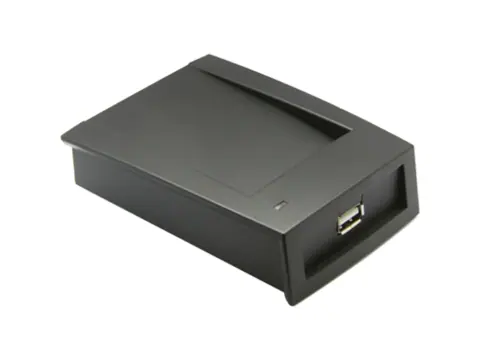
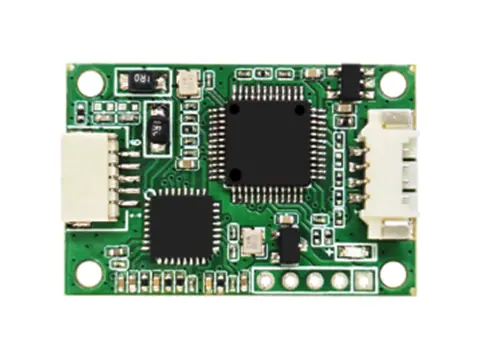
- Choose a complete desktop reader for an enrollment desk; HF-200-U is an embedded CCID board that requires an external antenna and integration.
- A supported chip name does not establish every write command, NDEF encoding or secure application operation. Approve the exact workflow with sample credentials.
- Freeze the variant SKU, firmware, output format, software and acceptance results before ordering production quantities.
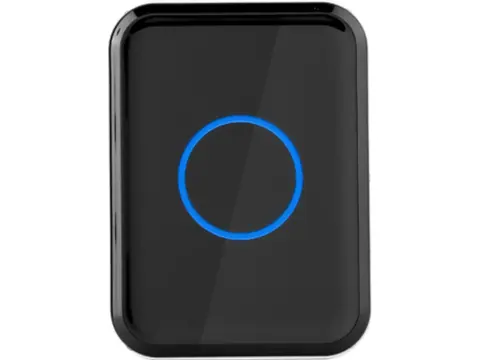
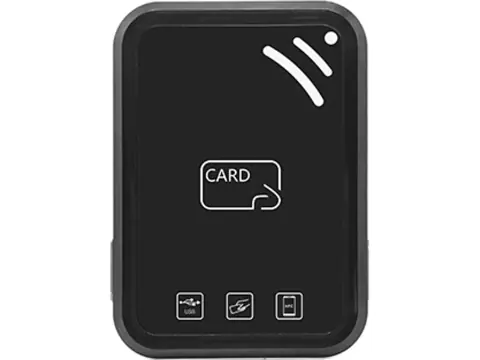
Choose a USB NFC reader by the operation your software must perform: capture a card UID, read card memory, write a tag, or authenticate an application. Then match the exact credential, USB mode and host software to a documented product variant. For an enrollment desk, start with a complete desktop reader. For a terminal that requires PC/SC, check documented reader and driver support; the CCID-capable HF-200-U is one listed candidate with separate antenna and integration requirements.
Start with a transaction, not the word NFC
“USB NFC reader” can describe several different purchases. A reception desk may only need a badge number in a registration form. A tag-issuing station needs to write application data and verify it. A kiosk may need to select a protected card application and authenticate before reading anything useful.
Write one sentence describing the required result, for example: “Read the full NTAG UID into our membership application,” or “Write a URL to our supplied tags and read it back.” Add the chip or credential generation, expected data and software environment. A chip-family name on a specification is a starting point for this check, not proof of all possible transactions with that chip.
| Required result | What to establish before choosing hardware | Sample acceptance result |
|---|---|---|
| Register a card number | Supported credential, complete UID, output conversion and USB mode | The application receives the expected identifier without truncation or lost zeros |
| Read stored data | Memory area or application, command support and access conditions | The intended data is returned through the application’s actual interface |
| Encode a tag | Exact chip, writable area, host commands, encoding software and lock state | Written data is read back correctly after removing and presenting the tag again |
| Use a protected credential | Card generation, application, authentication commands and key provisioning | Authorized reads succeed and rejected credentials fail as designed |
| Enroll legacy LF and new HF badges | Support for both bands and each credential family | Each badge produces the identifier already stored by the relevant system |
Do not order writing capability when the job only requires identification. Equally, do not choose a UID-only variant for encoding because its specification mentions the same chip family.
If a 13.56 MHz reader detects an NTAG card but misses an ICODE tag, check the air protocol before changing number formats. The ISO 14443 vs ISO 15693 compatibility guide explains the difference and identifies protocol-specific desktop and module configurations.
Compare actual desktop variants and the CCID module
The following shortlist reflects the listed product records. It separates documented operations from points that still need command documentation and sample validation. ValenID supplies these products as an independent supplier; the table is not an interoperability or certification claim.
| Candidate variant | Form and documented capability | Confirm before ordering |
|---|---|---|
| PC-130-M | Complete desktop reader; 13.56 MHz UID reading and configurable card-number output | Exact USB output behavior and number format; this variant does not encode NTAG or DESFire data |
| PC-130-D-MS | Complete dual-frequency reader; UID reading plus MIFARE Classic 1K/4K sector read/write and key changes | Required Classic commands, keys and host software; these write functions do not establish NTAG or DESFire writing |
| PC-110-MS | Complete desktop reader; MIFARE Classic 1K/4K sector read/write and key changes | Sector layout, command/API documentation and credential permissions |
| PC-110-MS-N | Complete desktop reader; adds CPU-card writing, DESFire EV1 files and Ultralight/NTAG read/write; active/passive modes | Exact chip generation and application commands; do not extend the EV1 file claim to every DESFire generation |
| PC-140-D-N | Complete 125 kHz / 13.56 MHz reader; USB HID/CDC switching and host-command read/write | Per-chip operations, HID report behavior, CDC protocol and target OS; no LF writing claim is established |
| PC-150-M-N | Complete 13.56 MHz multi-protocol reader/writer; USB HID/CDC, active/passive modes and two SAM slots | Compatible SAM, whether it is supplied, provisioning and commands; slots alone do not prove a secure workflow |
| HF-200-U | Embedded USB CCID board; ISO/IEC 14443A/B, 15693 and 18092; external 50 Ω antenna required | Antenna, housing and wiring; host PC/SC enumeration and card commands on the intended OS |
The full suffix matters. Ordering “PC-110” without specifying the capability tier leaves UID-only and reader/writer configurations ambiguous. For HF-200-U, the board does not become a desktop reader simply because the host connection is USB: budget the antenna and physical integration separately.
USB keyboard wedge, HID/CDC and PC/SC: buy the required behavior
For a browser form or spreadsheet, ask for keyboard emulation, also called keyboard wedge. This mode sends characters to the focused field. Confirm prefix, suffix, character pacing and keyboard layout with the actual application. If a pop-up or another window takes focus, that is a workflow risk even when the card reads correctly.
HID is a wider device class than keyboard emulation. A HID interface may exchange reports with host software instead of typing characters. PC-140-D-N and PC-150-M-N explicitly list HID/CDC switching, but their records do not establish that every HID mode is a keyboard wedge. PC-110 and PC-130 list driver-free USB and configurable output; request confirmation rather than deriving a keyboard mode from those descriptions.
For a background service, a CDC virtual COM interface can provide a serial connection without relying on keyboard focus. Your application still needs the ordered firmware’s frame format, commands and error handling. “CDC” does not identify the reader’s application protocol or prove that an existing serial application will understand it.
For a smart-card application built around PC/SC, request documented PC/SC support and validate the target reader driver and application. USB CCID is one standards-based route: HF-200-U explicitly lists it, while the desktop models above list other USB descriptions. Do not substitute a HID/CDC unit for a PC/SC unit based on a USB connector or a driver-free statement. PC/SC access also does not guarantee every authentication, write or NDEF operation with every supported credential.
Once the interface is agreed, use the USB reader output and card-number setup guide for number conversions, leading zeros, suffixes and enrollment troubleshooting.
Reading a UID, encoding NDEF and authenticating a card
A UID identifies the detected credential. It is distinct from a URL, text record, membership balance or protected application file stored on that credential. A successful UID read therefore does not demonstrate that the reader can retrieve or change your application data.
NFC Data Exchange Format, or NDEF, defines how application data is represented in records and messages. A procurement request for NDEF encoding needs both supported card access and software that constructs the intended message. Identify the tag type, payload, usable memory, password or key requirements and whether any lock settings have already made the target area read-only.
For an NTAG workflow, specify the exact chip and desired write operation. PC-110-MS-N lists Ultralight/NTAG read/write, while PC-130-M lists UID reading. Neither description proves that a particular off-the-shelf encoding application supports the ordered reader. Test writing, removal, rereading and interpretation with the software or device that will consume the payload.
For DESFire or another protected application, identify the card generation, application and file operations, communication requirements and keys. A supported-card list may only establish detection or UID reading. Use non-production test credentials for sample evaluation and agree a separate provisioning process; do not put production card keys in an ordinary inquiry form.
PC-150-M-N’s two SAM slots are a hardware feature. Confirm the supported module, connection, firmware commands and division of work between reader, SAM and host before specifying protected key handling. Neither an empty slot nor a successful card scan establishes that integration.
Validate the host OS, app and power arrangement
An operating-system listing is not a test report for your application. PC-110 and PC-130 list Windows, Android and Linux. PC-150 lists Windows 7, 8, 8.1 and 10, Linux, Android and macOS. HF-200 lists Windows 7 through 11. PC-140’s record does not provide a host-OS list. Confirm the intended current OS version, driver package, architecture, configuration tool and application library rather than extending one family’s list to another.
On Android, include the device’s USB host support, permissions, adapter and power arrangement in the test. On a browser-based desk, confirm whether the reader actually types into a field or needs a local integration service. For a PC/SC application, check reader enumeration and the required transaction through that application’s stack.
Test the reader on the same port, cable, hub or dock planned for deployment. Include reconnects, sleep/resume and application restarts. Approve the card presentation area with the final installation and real credentials; do not assign a universal read distance to every NFC reader or use maximum distance as a substitute for transaction reliability.
If the project embeds HF-200-U into a kiosk, use the RFID module integration checklist for antenna, supply, enclosure and end-product responsibilities.
Sample acceptance checklist before a bulk order
Agree the pass/fail criteria before testing and retain the result with the accepted sample. For a 1000-unit order, a successful scan on one engineer’s laptop is useful evidence, but it does not cover an enrollment application, operating systems or credential types that were not tested.
- Full variant SKU, firmware and enabled USB mode recorded
- Each actual card or tag type tested, including existing credentials being migrated
- Expected UID or application data captured without altered byte order, lost zeros or truncation
- Writing, authentication and rejection cases exercised where required
- Written data checked again after removing and presenting the credential
- Target OS, driver, application and configuration utility versions recorded
- Keyboard focus, layout and suffix tested if keyboard emulation is required
- Recovery checked after USB reconnect, sleep/resume and application restart
- Installed cable, hub or dock and card-presentation position included
- Multiple credentials and repeat presentations produce the intended application behavior
- Antenna, SAM, cable, adapter and software deliverables identified where applicable
- Accepted configuration and agreed inspection criteria included in the production order
Request samples and volume pricing separately. Confirm minimum quantity, available configuration, delivery terms and any required compliance documentation for the exact ordered build. Technical capability records do not establish current stock, a guaranteed shipping date or approvals for the finished system.
RFQ details that help us check compatibility
Send the operation and expected result with the quantity. “1000 NFC readers” can otherwise refer to UID readers, tag encoders, complete desktop devices or embedded boards with very different integration work.
Application and quantity:
Desktop unit or embedded module:
Candidate family and full variant SKU:
Exact credential chips / generations / protocols:
Required operation: UID / memory read / write / authenticated application:
Example expected output or non-sensitive test payload:
Required USB behavior: keyboard wedge / HID reports / CDC / CCID-PC/SC:
Host device, OS version and application / library:
Output format and prefix/suffix, if applicable:
Antenna, SAM, cable and adapter requirements:
Sample acceptance criteria and deployment country:
Prepare your USB reader project brief if you have not selected a model. Add the required operation, card chip and host setup, then review those details in the inquiry form. You can also request a quote and compatibility review with the RFQ details above. We can check the candidate configuration and identify what requires a sample test before the order specification is finalized.
Technical references
The product comparison uses the linked product records; the following primary sources explain the interface and data-format distinctions used here:
- USB-IF HID specifications and tools describe HID reports and usages. This is why a generic HID label does not establish keyboard output.
- USB-IF CCID specification and Microsoft’s smart-card specifications and resources cover the USB smart-card class and Windows interoperability framework. Actual reader, driver and card transactions still require validation.
- NFC Forum NDEF technical specification defines the common application data format. NDEF support is a separate question from UID output and the reader’s USB mode.
Frequently asked questions
What is the difference between a USB NFC reader and a USB NFC writer?
A UID reader returns a card identifier. A writer also supports commands to modify specified card memory or applications, using compatible host software and any required keys. A model that reads an NTAG or DESFire UID is not automatically able to write that chip.
Is every USB HID NFC reader a keyboard wedge?
No. HID is a USB device class that includes keyboard and other report-based interfaces. Request explicit keyboard-emulation confirmation and test a card in a focused text field; a generic HID listing or driver-free claim is insufficient.
Which listed product uses USB CCID for PC/SC applications?
HF-200-U explicitly lists USB CCID. It is an embedded 13.56 MHz module with an external 50 Ω antenna requirement, not a complete desktop unit. Its listed host systems are Windows 7 through 11; confirm the actual driver, application and card operations with a sample.
Can these readers encode an NFC URL or other NDEF message?
NDEF is an application data format rather than a USB mode. Confirm the tag type, available write commands, host encoding software and write protection. The product records do not establish a complete NDEF encoding workflow for every listed tag or model.
Can I use the same reader for 125 kHz badges and NFC tags?
Only a suitable dual-frequency version. PC-130-D covers 125 kHz EM and 13.56 MHz UID reading, while PC-140-D-N lists both bands and host-command read/write operation. NFC operates at 13.56 MHz; dual frequency does not imply writing 125 kHz cards or supporting every HF tag.
What should I approve before buying 1000 USB NFC readers?
Approve samples with your exact credentials, target operating systems and application. Record the full variant SKU, firmware, USB mode, output or command format, required accessories and pass/fail criteria, then use those details in the production order.
Want a second opinion on your spec?
Send your application, existing hardware, interfaces and quantities — we'll review the requirements and quote within 24 hours.